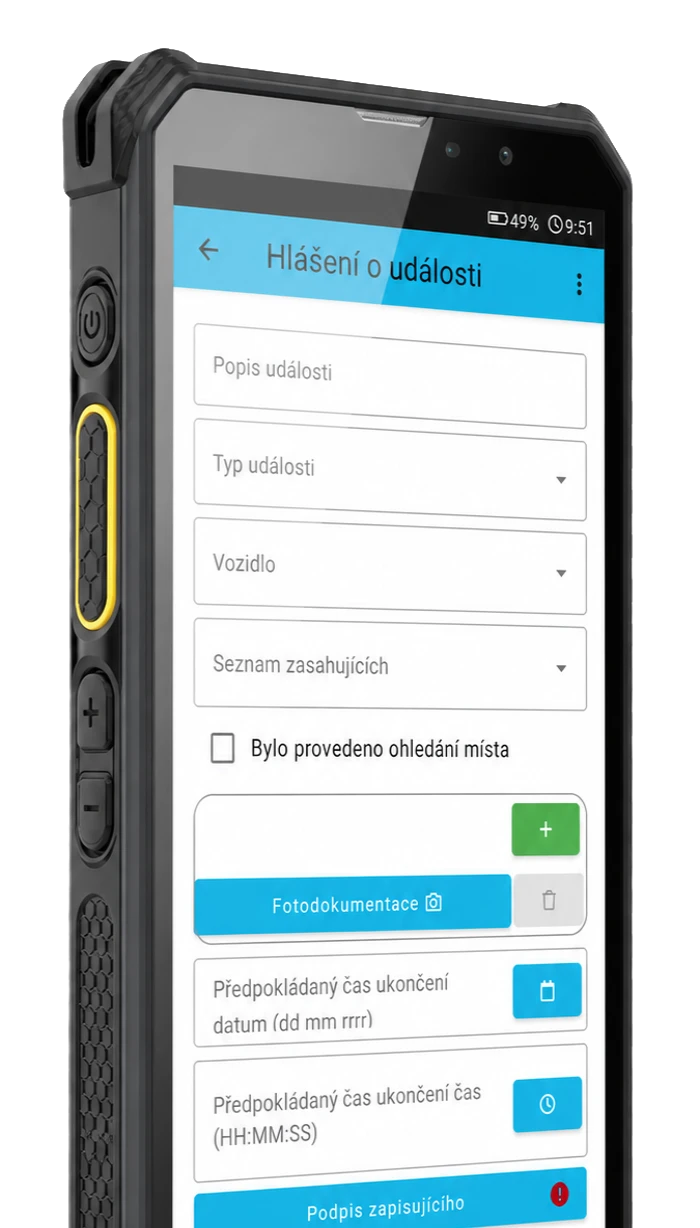
Digital recording instead of paper
Replace paper forms, they have many advantages
On-site filling
Digital field recording, automatic archiving
Fewer typos and errors
No overwriting, elimination of errors thanks to predefined filling options
Data immediately available
Online, data is instantly available anywhere with an internet connection
Paper forms are holding the company back
Paper forms may look simple at first glance, but in practice they often mean more work, poorer traceability and unnecessary transcription of data into Excel or other internal reports. If a company collects data directly digitally, double administration is eliminated and the information is immediately ready for further processing.
TOUCHGUARD allows you to create custom forms according to the specific needs of your operation and fill them out directly on your mobile device. Completed forms are sent to a server where they can be viewed, tracked, exported and used in downstream processes.
How it works
1. Create a form template
The administrator prepares the form according to the specific operation, control or workflow.
2. The worker fills in the form on the mobile phone
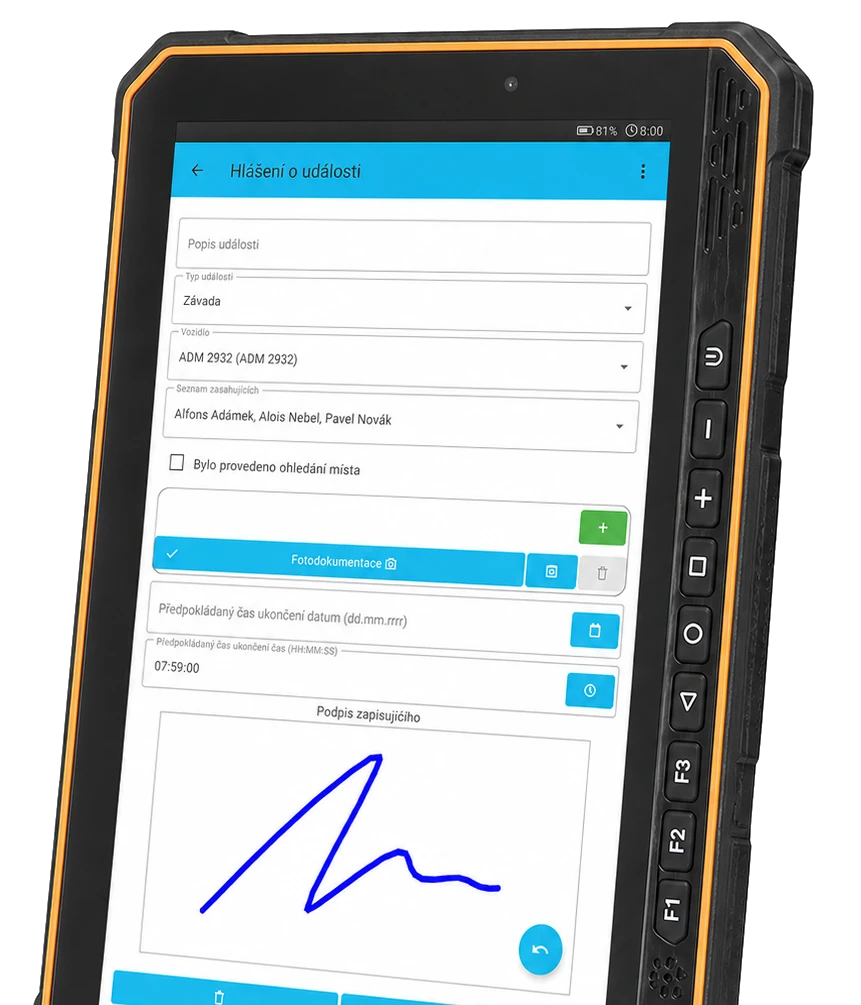
Completion takes place directly in the mobile terminal or tablet, including signature, attachments and required fields.
3. Data is stored electronically
The completed form is sent to the server where it is ready for tracking, checking and further work.
4. Set up exports, reports and notifications
Forms can be displayed, exported and automatically sent out or used in other processes as required.
Higher credibility of the record and better audit trail
If a company is still working with paper forms, it often faces the same problem: the record exists, but tracking it down, checking it and processing it further costs unnecessary time. TOUCHGUARD's digital forms help to convert this process into an electronic format that is clearer and better prepared for day-to-day operations.
The result is not only less paper, but also less room for inaccuracies, fragmented record keeping and subsequent rewriting. If necessary, location data can also be worked with if the company uses GPS.
One solution for dozens of form types
TOUCHGUARD is not one fixed form. The administrator can create custom templates according to the specific operation, job, type of control or internal procedure.
Forms can contain text and numeric fields, option selections, checkboxes, date, signature, attachments, photo documentation and repeatable groups of elements. This makes the solution suitable for manufacturing companies, industry, logistics, maintenance, facility management and field workers.

Workplace audit
OHS checklist
Fire control
Control formDefect Reporting
Service protocol
Revision protocol
Transfer protocol
Output control
Input control
Vehicle inspection
Daily checklist
Weekly check
Monthly check
Maintenance records
Operational diary
Cleaning records
Warehouse control
Loading
Unloading
Installation protocol
Field record
Photo documentation
Intervention record
Checking the equipment
Repair of equipment
Inspection of PPE
Shift control
Inspection checklist
Internal audit
Managing forms in administration
Digital forms are not fixed. The administrator can create and modify templates according to specific operational needs, object type or workflow.
It is the combination of administration in the system and filling in on a mobile device that makes forms a practical tool for everyday operation, not just a simple web form.
Filling out forms on mobile and tablet
Filling out the form is done directly on your mobile phone, tablet or terminal, so there is no need to write the data on paper and then manually transcribe it into the system. The user selects the form, fills in the required data and after submission the record is saved on the server.
Forms can be created and managed in the web interface on a PC. They can be assigned to different activities as needed. All remotely from the comfort of the office.
Digital forms adapt to small phones and large tablets. It depends on the specific use case.
What digital forms bring
Higher credibility of the record
A digital form creates a clearer and more easily documented record than paper, which can be lost, damaged or reversed.
Better traceability
Completed forms are stored electronically and can be easily retrieved, viewed, filtered or used for further review.
Less typing into Excel
The data is created directly in digital form, so there is no need for the usual intermediate step where a worker fills out a paper and someone else transcribes it into a spreadsheet.
Faster work in operation
Forms can be filled out directly on the mobile terminal or tablet, including signature, attachments, photo documentation and required fields.
What data can be collected in the forms
Text and numeric data
- names, notes, descriptions of defects
- counts, values, readings and measurements
- date and other basic operating data
Control answers
- yes / no
- choice of pre-prepared options
- multiple answers via checkboxes
Evidence and supporting data
- signature of the responsible person
- photo documentation and attachments
- optional location data when using GPS
Custom forms according to your processes
Custom form templates
The administrator creates forms tailored to a specific operation, workflow or type of control. Individual form items and their order can be defined.
Required fields and submission control
Selected fields can be marked as mandatory. The form cannot be submitted without filling in the key data or without meeting the set conditions.
Storage on the server and central management
Completed and submitted forms are stored directly on the server, not just in the memory of the mobile device. This makes them available for further processing and checking.
Multiple field types
The form can contain text and numeric fields, date, checkboxes, a selection of predefined options, headings, section separators or custom images.
Repeatable groups of elements
It is possible to insert groups of elements into the form, which the user can add repeatedly while filling in the form. This is useful, for example, when taking multiple photographs or recording multiple faults.
Reports, filtering and exports
Submitted forms can be viewed, filtered by date, user or status and exported to PDF and CSV for further work or archiving.
Signature, attachments and photo documentation
The form can include a signature directly on the mobile device, attached files and photo documentation from the place of inspection or intervention.
Enumeration types and important states
Pre-prepared lists of values speed up form completion. Selected answers can also be marked as important or invalid to be quickly visible in the system.
Notifications and automatic sending
Form creation or a selected event can be followed by an email notification. Reports can also be sent out automatically on a regular basis.
Interconnection with other TOUCHGUARD functions
Forms and online errands
The forms can be used in conjunction with checkpoints and errands, so that the check is not just a confirmation of presence, but also the recording of specific data.
Forms and equipment
Forms can be assigned to the registered devices and after the device has been loaded via code or NFC, the user is offered the appropriate form to fill in.
Forms and lone worker
For companies with field workers, the forms can also be combined with the mobile lone worker protection function.
Forms and visits
By embedding the form into the visits, the visit process can be tailored in detail to each facility, including signatures, instructions or other mandatory information.
Where digital forms are most commonly used
Production and industry
Site inspections, shift checklists, internal audits, defect records, service logs and operational records.
Maintenance and service
Intervention protocols, repair records, equipment inspections, revisions and on-site photo documentation.
Logistics and warehouses
Vehicle inspections, acceptance, loading and unloading, handover reports or regular operational checks.
Field workers
Mobile forms for work outside the office, where speed of completion, overview of the activity performed and connection to other functions of the system are important.
Solutions we can help to solve




Frequently asked questions
Can completed forms be exported?
Yes, forms can be viewed, exported to PDF or CSV and sent electronically to specified addresses.
Can forms be adapted to specific traffic?
Yes, the administrator can create custom form templates according to the needs of the company and choose their individual items and structure.
Can forms be linked to devices or checkpoints?
Yes, TOUCHGUARD allows you to link forms to other system functions, such as devices or checkpoints.
Can I set mandatory fields?
Yes, important information can be marked as mandatory, so the form cannot be submitted without filling it in.
Do the forms also work for field workers?
Yes, the forms are designed to be filled in on mobile terminals and are also suitable for staff outside the office or on site.
Do the forms have a signature and photo documentation?
Yes, forms can include signature fields, attachments and photo documentation directly from the mobile device.
How to get a sample solution?
Just contact us and we will be happy to present you with a solution according to your type of operation.
Is it also possible to use location data?
Yes, location data can be part of the solution if the company uses GPS.
What are digital forms for businesses?
These are electronic forms that replace paper records in production, logistics, maintenance, operations or in the field.
What types of fields can forms contain?
There are text and numeric fields, date, checkboxes, options, headings, section separators, signature, attachments and custom images.