
Standalone operation without a phone
Thanks to the integrated eSIM, the watch has its own 4G/LTE connectivity.
Alarm to server, SMS and voice call
To ensure maximum safety, the watch uses all available communication channels.
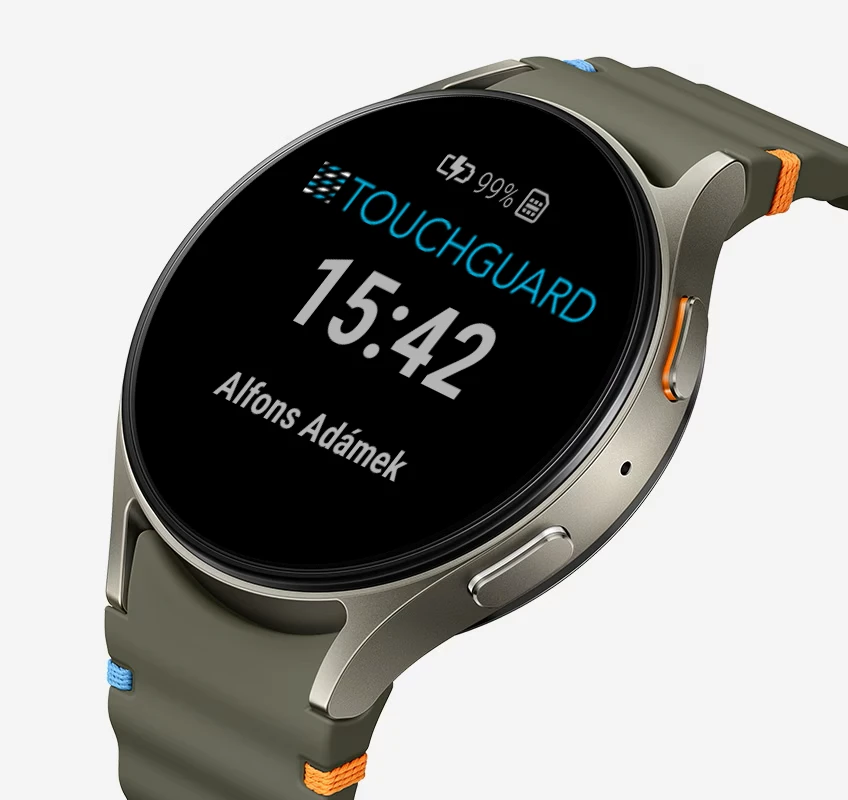
Proven Samsung Galaxy Watch
Professional deployment requires the use of high-quality products for high reliability.
Physical SOS button directly on the watch
A hardware button is used for a truly fast alarm triggering. Just hold it down and the alarm is immediately raised.

Legislation
Our application offers a possible solution for fulfilling the legal obligation under Act No. 309/2006 Coll. on ensuring other conditions of occupational safety and health. Since Czech legislation does not specify how the protection should be technically implemented, the LWPS system is developed according to the British Standard BS 8484.

The watch is not enough for me
Need more features? The mobile phone application also includes the Lone Worker Protection function and offers additional possibilities for use.
How it works
The TOUCHGUARD app with the lone worker protection function in smartwatches is built around monitoring unusual events. If the set conditions occur, the system first triggers a pre-alarm and then automatically raises a full alarm.
1. The watch monitors risky situations
The system can evaluate a fall, heart rate level measurement, inactivity, removal of the watch from the wrist, and a manually triggered alarm using the SOS button. It is absolutely essential that the worker wears the watch with the strap fastened.
2. Pre-alarm is triggered
The pre-alarm gives the worker time to confirm they are okay. It usually lasts 30 to 60 seconds and can be cancelled on the watch display.
3. The watch raises a full alarm
After the pre-alarm expires, the watch automatically enters an alarm state. The alarm state is clearly signaled on the watch.
4. The alarm is sent further
The alarm can be notified to the server, via SMS, or by voice call. These methods can be combined according to operational requirements.
Key features
The system is based on monitoring unusual events. Individual types of detection can be combined according to the environment and set independently for each device.
The watch application is focused purely on the protection of the lone worker and concentrates on the rapid evaluation of a risky situation and the transmission of an alarm.
Fall detection
Heart rate measurement
Inactivity and immobility
Removal of the watch from the wrist
Fault reporting
SOS button
Alarm to server
SMS notification
Voice call
Connection monitoring
SOS button
A user alarm can be triggered by long-pressing the red button on the side of the watch until the watch vibrates.
Voice call and SMS
After an alarm, the watch can automatically call set contacts and simultaneously send an SMS with alarm information.
Individual settings
Each watch can be set independently according to the risk of a specific location, workplace, or shift.
Connection monitoring
The system periodically checks the communication between the watch and the server and alerts you to any loss of connection. Without a network connection, some functions may not be available!
Web application for dispatching and management
The server part of TOUCHGUARD is accessible via a standard web browser and allows complete management of mobile terminals, user rights, signalling methods and setting of Lone Worker functions for individual devices.
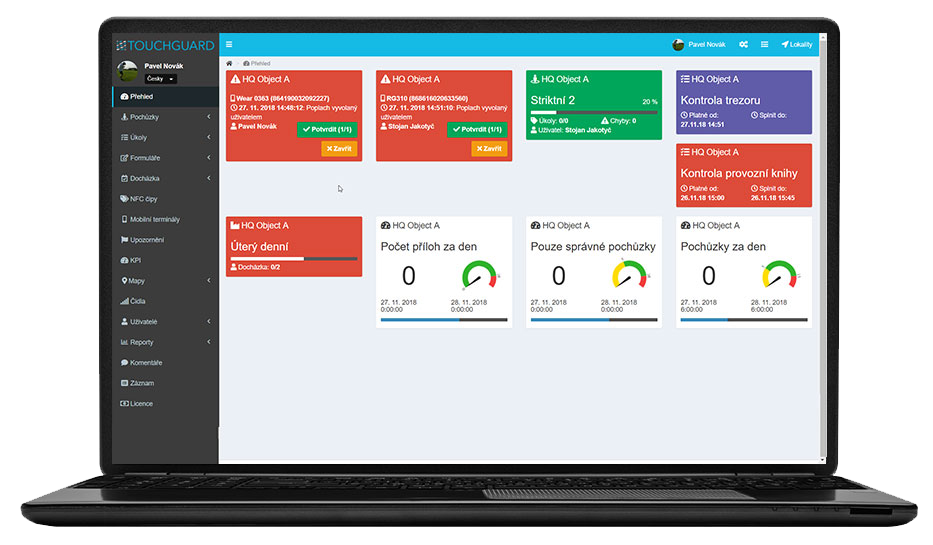
Overview of alarms
The dispatcher can see the alarms in the application overview and can react quickly to the event.
Settings for each terminal
Each mobile phone can have its own combination of detection, signalling and activation conditions.
Rights and structure of sites
The system supports both user permissions and a site tree structure for larger organizations and multiple sites.
Management and operation
To ensure the safe and reliable operation of the TOUCHGUARD WATCH app, we exclusively use Samsung Galaxy Watches together with the Samsung Knox Manage remote MDM system. Knox Manage is the only system that can manage watches just like work mobile phones and is key to the smooth operation of the TOUCHGUARD WATCH system. Connectivity is provided by an eSIM from T-Mobile, which is included in the price of the service.
- App installation and automatic updates
- Content restriction and prevention of unwanted changes to settings
- Auto Call Answer for automatic answering of calls from selected numbers
- Remote setting of Wi-Fi networks
- Kiosk mode using only permitted applications
Who is the solution suitable for



Frequently asked questions
Can the watch be managed and configured remotely?
Yes, the devices are managed remotely.
We use the Samsung Knox Manage system, which allows for central installation of applications and updates, Wi‑Fi configuration, kiosk mode setup, and the restriction of unwanted setting changes. The lone worker protection features themselves are configured via the TOUCHGUARD web application for administrators.
Do the watches require a mobile phone to function?
No, the solution is designed to be autonomous.
Samsung Galaxy Watch smartwatches operate independently and have their own connectivity via eSIM 4G/LTE or Wi‑Fi. Therefore, the worker does not need to carry a phone for the lone worker protection to function.
How do the pre-alarm and the alarm itself work?
When the watch detects a risk event, it first triggers a pre-alarm.
The worker has a short period (e.g., 30–60 seconds) to confirm they are okay and cancel the alarm directly on the watch. If they do not respond, the device automatically enters a full alarm state, which is clearly signaled on the watch.
How is the responsible person or dispatch center notified of an alarm?
The alarm from the watch is transmitted to the TOUCHGUARD server, where it is visible to dispatch in the web application.
Simultaneously, the watch can automatically call selected numbers and send SMS messages, allowing for a combination of multiple delivery methods based on operational requirements.
How to get a sample solution?
Just contact us and we will be happy to present you with a solution according to your type of operation.
Is it also possible to use location data?
Yes, location data can be part of the solution if the company uses GPS.
What do I need to run TOUCHGUARD?
Internet access and Android phone only + NFC function for chip loading
What if my phone loses internet?
If the phone loses data connection but voice call and SMS are available, the phone will use these 2 communication channels to notify you of the alarm. The system will alert you to this condition, but without a data connection, lone worker protection may not be fully functional.
What is the difference between lone worker protection on a smartwatch and on a mobile phone?
The smartwatch version is the most compact and focuses purely on lone worker protection directly from the wrist, without the need to carry a phone.
The mobile version can cover broader scenarios and additional functions, but a device in a pocket or on a belt is not always practical; therefore, the smartwatch version makes sense wherever simplicity and minimal burden on the worker are important.
What situations can the system monitor in the watch?
Inactivity, heart rate level measurement, impact, free fall, wakefulness and also loss of data connection of the device.
What situations does the watch system evaluate?
The watch can evaluate several types of risk events: falls, immobility or inactivity, removal of the watch from the wrist, heart rate outside set limits, and manually triggered alarms via the SOS button. The specific combination of detections and their sensitivity can be configured according to the workplace type and risk level.